· 1 min read
How to Check a Jewelry CAD Before You Approve It: A 10-Point Review
By The CAD Pillar team · jewelry CAD for US jewelers
In short
Before you approve a jewelry CAD, check the inside diameter against the ring size, every stone seat against the stones' millimeters, prong and wall thickness for the metal, the head height, the gold weight and the files. Turning the model in a live 3D view shows problems a front render hides.
The 10-point review
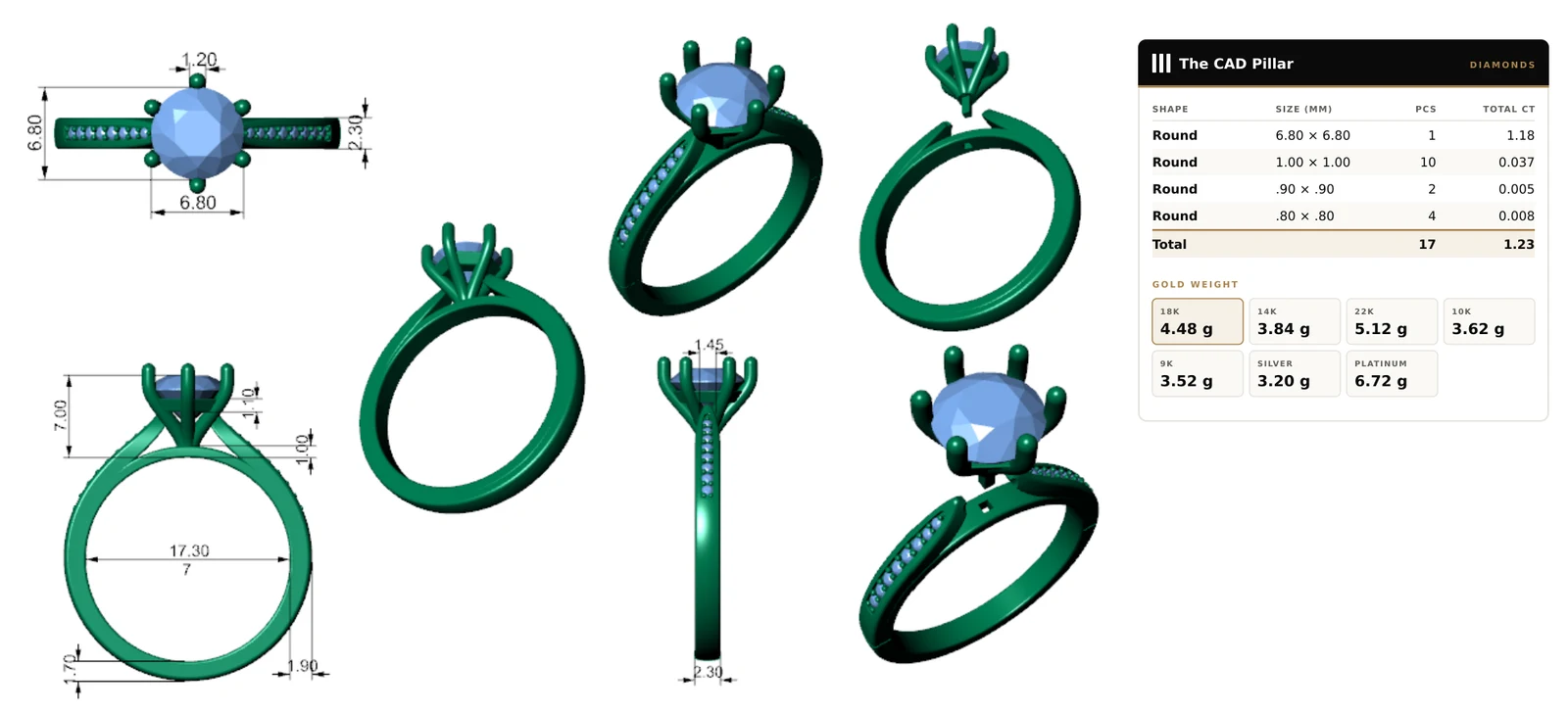
- Inside diameter. Compare the technical sheet with the ring size chart: a US 7 should read about 17.3 mm.
- Center stone seat. It should match the stone's measured length and width; the girdle sits under the prongs, not on top of them.
- Side stones and melee. Count them, and check each size against the diamond list.
- Prongs. Even, the same height, and thick enough to hold and to survive polishing.
- Walls and shank. No thin spots, especially under the head and at the back of the band.
- Head height. The culet clears the finger, and the ring sits flat on the hand.
- Gallery and under-gallery. Open enough to clean; nothing that catches on clothing.
- Symmetry. Turn the model: left and right shoulders match, stones line up.
- Gold weight. Fits the price. The weight in every karat should be on the sheet.
- Files. 3DM to edit, STL to print, at the size your caster asked for.
Why a live 3D view beats renders for approval
Renders are chosen angles. A live 3D view lets you, or your customer, turn the ring, zoom into the prongs and look underneath, which is where most problems hide. At The CAD Pillar every first look comes with a live 3D link you can share under your own name, and you approve from it.
What a technical sheet should show
- Views from the front, side and top with the main measurements.
- The inside diameter and ring size.
- The diamond list: shape, size, count and total carat per size.
- The gold weight in every karat you might cast in.
You can see a full example on any piece in our portfolio.
When to ask for a change
Ask before approving if anything in the review fails, or if the customer is unsure. A change in CAD takes hours; a change after printing or casting costs metal and days.
Related
Questions
- What should I check before approving a jewelry CAD?
- The inside diameter, the stone seats against the stones' millimeters, prong and wall thickness for the metal, head height, symmetry, the gold weight and the files your caster needs.
- Is a render enough to approve a ring design?
- Renders show chosen angles. A live 3D view lets you turn and zoom into the prongs and underside, where most problems hide, so it is the safer way to approve.
- What does a jewelry technical sheet include?
- Front, side and top views with measurements, the inside diameter and ring size, the diamond list with sizes and counts, and the gold weight in every karat.